

WOW! E-Reader Remote Page Turner Only $3.99 on Amazon (Reg. $32)

As an Amazon Associate, Hip2Save earns a small commission from qualifying purchases in this post. Amazon prices and promotions are accurate at the time of posting and subject to change. Read our full disclosure policy here.

More Amazon

Keep your hands free with this E-reader remote page-turner! 

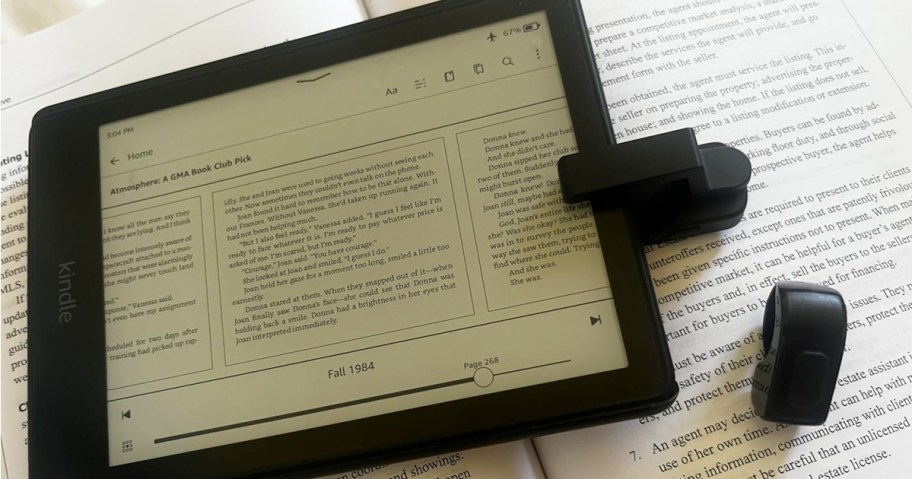
hand holding ereader remote control next to kindle

Through October 26th, head over to Amazon you can snag this Sycelu E-Reader Remote Control Page Turner in Black for just $3.99 (regularly $31.99) when you use promo code HFZRJREZ at checkout!

Snag one w/ this deal:

E-Reader Remote Page Turner in Black $31.99
Use promo code HFZRJREZ
Final cost $3.99!

hand holding ereader remote control in front of kindle

Remotely change the pages on your e-reader so you can stay cozy under the covers! This device clips onto the side of your tablet to turn pages with just a push of the remote. It works with most e-readers, including Kindles, iPads, and more.

Note that the Amazon Fire HD 10 (10th/11th generation) is incompatible.


Prime members score free eBooks each month!


About the writer:

Denise has been blogging since 2018 and following Hip2Save since 2008. With a Bachelors degree in Business from Purdue University and 15 years of banking experience, she always has savings on her mind. When she's not browsing the clearance racks of Target, you can find her watching documentaries or cheering on her son at his soccer games with her family.


Join The Discussion

Comments 9

  1. mikaela

    Everytime one of these comes up as an offer I have yet to get one, the promos never work on these page turners for some reason.

    • Trish (Hip Sidekick)

      Sorry for the troubles, mikaela! Hi! I just tested this and it looks to still be working. Here’s a few tips/tricks to try:
      1. Be sure you have the black option only in your cart.
      2. There may be a limit of one, as many Amazon promos are, so if you have more than one in your cart, try removing others.
      3. Once you’ve entered the promo code, if you’re on a mobile device, be sure to click “apply” next the text box, as just clicking “continue” won’t apply the discount.
      4. Try removing it and adding to your cart again then heading to the final stage of checkout—just before placing your order.
      Hope these are helpful! ❤️

    • Darla

      It just worked for me. After you copy the promo code in, make sure you are clicking the arrow beside it before clicking continue

  2. Cheri

    This worked for me! I have also tried on the other page tuner deals and it has never worked but this one did 🙌🏻.

    • Trish (Hip Sidekick)

      YAY! 🙌 So glad you were able to snag one this time, Cheri!

  3. sunnynikks

    Yay! I was able to get one. Thank you so much!

    • Trish (Hip Sidekick)

      Woot! 🎉 You’re very welcome!

  4. Jacie

    Once I enter coupon code, I get a message that promotional code is not valid.

    • Alli (Hip Sidekick)

      Oh no, Jacie, it looks like they ended the code early. 😢 Thank you so much for letting us know. Hopefully we see another deal on these soon! 🤞

Leave a Reply

Your email address will not be published. Required fields are marked *

It's not your Grandma's coupon site!

Sign up for a Hip2Save account (it's free) to access all of the awesome features!

Forgot Password?

Don't have an account? Register

Forgot Password

Don't have an account? Register

Become a Hip2Save Insider

Don't Miss Out! Join our large community of insiders - it's totally free! Once you join, you'll be able to save & share your favorite deals, rate posts and recipes and add items to your HipList and Cookbook! What are ya waiting for?!


Already have an account? Login

Thank you for rating!

Would you also like to leave us a comment?